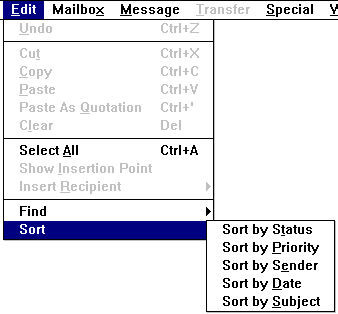
To use any of these commands, first open the mailbox to be sorted. Then, select the appropriate command from the Sort submenu. The messages are sorte d when the mouse button is released.
Eudora sorts in ascending order; the smallest item first. To sort in descending order, hold down the [SHIFT] key while choosing the desired command from the Sort submenu.
Tip: Eudora's sorti ng algorithm is "stable". This means that sorting on a particular column leaves items of the same value in the same order as they were before the sort. This feature allows you to sort based on multiple criteria by using multiple sort commands. For exam ple, if you want your messages sorted by subject, and within each subject you want messages sorted by date, first choose Sort by Date, then Sort by Subject.
Note: Sometimes Eudora does not sort by Date properly. This happens if mes sages have incorrectly formatted date fields or unknown or incorrect time zones. Also, since Eudora uses Greenwich Mean Time (GMT) when sorting by date, the messages may merely appear to be out of order because the time stamp is the local time at the loc ation where the messages originated. For example, a message sent at 11;30 EST is listed before a message sent at 10:00 PST, because 11:30 EST actually occurs before 10:00 PST.