SET TMP=C:\TMP (or some temp directory)
Make sure that this directory exists.
If you wish your mail files to reside somewhere other than where the executable resides, then you ca set the mail directory specifying the directory as the first parameter on the command line of the Program Item th at you create for Eudora.
This is also useful if you want to have multiple users on one PC, each with their own mail directory. Eudora will use the directory on the command line first. If that isn't present, the directory where executable resides will be used.
Note: always keep the Help file in the same directory as the executable.
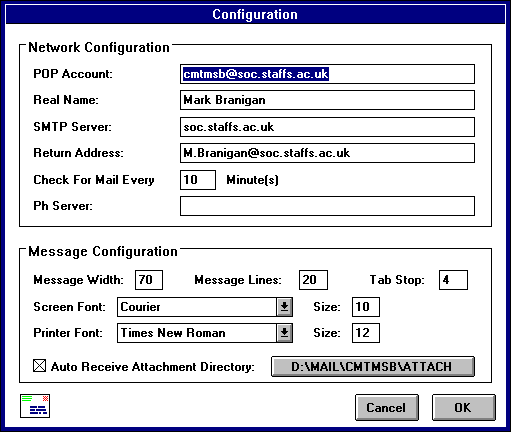
To use Eudora, you must have an account on a computer that runs a POP3 server. This is the account to which your e-mail messages are delivered before they are transferred to the Eudora program on your PC. In the POP account filed, type your login name for this account and the full (domain) name of the computer, separating them with an "@" (at) sign. For example, if you assigned login name is "carolyn" and the name of the computer where you receive e-mail is is "uxh.cso.uiuc.edu", type "caro lyn@uxh.cso.uiuc.edu" in this field.
In the Real Name filed type your real name. Your name, as it appears here, is displayed in parenthesis after your return address in your outgoing mail. It is also displayed in the sender column of all me ssages sent by you.
At this point, it is best to leave the other items unchanged and click OK. You are now ready to use Eudora.