VAX/VMS systems may try the "Multinet" package from TGV, or IUPOP3, available via anonymous ftp from ftp.indiana.edu.
For VM/CMS users, there is a port of "popper" available via anonymous ftp from vmd.cso.uiuc.edu (cd to the "POPD" directory).
[CTRL] + [A] Select all
[CTRL] + [B] Move window behind all other windows
[CTRL] + [C] Copy
[CTRL] + [D] Delete message
[CTRL] + [E] Queue/Send an outgoing message
[CTRL] + [F] Open Find window (search for message)
[CTRL] + [G] Find again
[CTRL] + [H] Attach docume
nt to outgoing message
[CTRL] + [I] Open In mailbox
[CTRL] + [K] Make nickname
[CTRL] + [L] Open Nicknames window
[CTRL] + [M] Check mail
[CTRL] + [N] New message
[CTRL] + [P] Print message
[CTRL] + [Q] Quit Eudora
[CTRL] + [R] Reply to message
[CTRL] + [S] Save contents of topmost window
[CTRL] + [T] Send queued messages
[CTRL] + [U] Open Ph window
[CTRL] + [V] Paste
[
CTRL] + [W] Close message
[CTRL] + [X] Cut
[CTRL] + [Z] Undo
[CTRL] + ['] Paste as quote
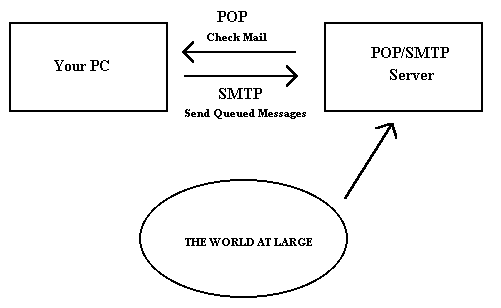
Why doesn't Eudora talk directly to your addressee's computer? For one thing, it would take a lot longer for your mail to leave your PC, bec ause your PC would have to call up each addressee's computer and deliver your mail. For another, some computers are "hard to find"; it's much better to let another computer "hunt" for your addressee than to make your PC do it. Finally, sometimes your ad dressee's computers won't be available when you want to send mail. The SMTP server handles this by holding your mail until the other computer is ready to accept it, eliminating the inconvenience of having unsent messages hanging around on your PC.
Why doesn't Eudora use SMTP to receive your mail? SMTP works best when the computers it knows about are always ready for mail. Unless you wanted to run Eudora and your PC 24 hours per day, seven days a week, SMTP wouldn't work very well for you. It also doesn't work well in lab environments, where you might use any number of different PCs.
If you want to know more about SMTP, RFC 822, POP3 and MIME, the official standards are:
RFC 821, "Simple Mail Transfer Protocol", by Jonathan B. Postel
RFC 8 22, "Standard for the Format of Internet Text Messages", by Dave Crocker
RFC 1225, "Post Office Protocol, Version 3", by Marshall Rose
RFC 1521, "Multipurpose Internet Mail Extensions", by Ned Freed and Nathaniel Borenstein
You can find the RFC's by anonymous ftp to nic.ddn.mil; see Internetworking with TCP/IP for details.
MIME provides a way around this restriction. It offers two encodings, "quoted-printable" and "base64". These encodings use US-ASCII character codes to represent any sort of data you like, including spe cial characters or even non-text data.
Quoted-printable is used for data that is mostly text, but has special characters or very long lines. Quoted-printable looks just like regular text, except when a special character is used. The special cha racter is replaced with an "=" and two more characters that represent the character code of the special character. So, a bullet in quoted-printable looks like "=95".
However, there are some other things that quoted-printable does. For on e, since it uses an "=" to mean something special, equal signs must themselves be encoded (as "=3D"). Second, no line in quoted-printable is allowed to be more than 76 characters long. If your mail has a line longer than 76 characters, the quoted-printa ble encoding will break your line in two, and put an "=" at the end of the first line, to signal to the mail reader at the other end that the two lines are really supposed to be one. Finally, a few mail systems either add or remove spaces from the ends o f lines. So, in quoted-printable, any space at the end of a line gets encoded (as "=20") to protect it from such mail systems.
Let's try an example. Here's a passage of text that you might type on your PC:
«Il est démontré, disait-il, que les cho ses ne peuvent être autrement; car tout étant fait pour une fin, tout est nécessairement pour la meillure fin.»
Without any encoding, this might show up on your recipient's screen as:
+Il est dimontri, disait-il, que les ch oses ne peuvent btre autrement; car tout itant fait pour une fin, tout est nicessairement pour la meillure fin.;
This corruption happens because SMTP cannot handle the special characters. However, if you and your recipie nt both have MIME, quoted-printable encoding would be used, and your text would show up properly:
«Il est démontré, disait-il, que les choses ne peuvent être autrement; car tout étant fait pour une fin, tout est nécessairement pour la meillure fin.»
While your mail was actually in transit, however, it would have looked like:
=ABIl est d=E9montr=E9, disait-il, que les choses ne peuvent =EAtre =
autrement; car tout =E9tant fait pour une fin
, tout est n=E9cessairement =
pour la meillure fin.=BB
Base64 encoding is another way to protect binary data from the SMTP mail system. However, Base64 makes no attempt to be legible, and is most appropriate for non-text data.
          Content-Type: text/plain; chars

et=iso-8859-1
A content-type header is divided into three parts; the content type, the content subtype, and the parameters. In this case, the content type is "text" meaning the message contains mostly legible text. The content subtype is "plain" which means there aren't any formatting commands or anything like that embedded in the text. Finally, "charset=iso-8859-1" is a parameter; in this case, it identifies the character set the message uses.
The major content types are :
text           legible text
image          pictures and graphics
audio          sound
video          moving pictures
message        messages or pieces of messages
multipart      several different kinds of data in a single message
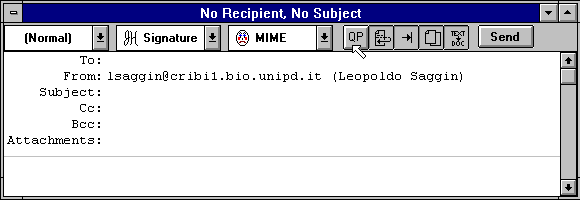
Eudora knows about some MIME types. However, since new MIME types are being defined all the time, it may be necessa ry to add to Eudora's knowledge from time to time. Adding new mappings between the various types only requires editing the eudora.ini file with a text editor (like the one that comes with Eudora).
There is a section in the eudora.ini file labelled [Mappings], followed by some entries, one per line. Each entry is called a map. A map defines when the mapping should occur (which can be "in" "out" or "both"), followed by an equal sign and five parameters. These five parameters are (in order) the PC file extension, the Macintosh creator code, the Macintosh type, the MIME type, and the MIME subtype. Here are some sample entries:
[Mappings]
both=gif,,,image,gif
both=mpg,,,video,mpeg
both=doc,MSWD,,,
in=xls,XCEL,,,
out=xls,XCEL,XLS4,,
both=eps,,EPSF,application,postscript
A map marked "in" only tries to match the map to messages that you receive. A map marked "out" only tries to match the map to messages that you send. A map marked "both" tries to match the map to both incoming and outgoing messages.
The first map says that any incoming MIME message that has a part type of "image" and subtype of "gif" will get saved to a file with the extension ".gif." It also specifies that outgoing messages that have an attachment with the file extension ".gif" will get the MIME type of "image" and subtype of "gif" if the encoding method of the message is MIME. The second map is similar to the first map in structure, but uses a different file extension and MIME type a nd subtype.
You can use map entries to move between PC file extensions and Macintosh creator and type as well. The third map says that if an incoming message has an attachment with the Macintosh creator "MSWD" (which is the Macintosh creator for Microsoft Word), then the file extension of the attachment when saved to disk should be ".doc" (the file extension that Word for Windows uses). Since the map is marked as "both," it will also give attachments with the extension ".doc" on outgoing messages the Macintosh creator of "MSWD" if the encoding method of the message is BinHex.
Note that the Macintosh type from this map is empty. This allows multiple types to be recognized with just one mapping. This is nice for "in" maps because it al lows you to cover a range of creator/type pairs with one map. You must be careful in using this type of map with an "out" or "both" mapping, though, because an outgoing attachment that matched this map would have a Macintosh creator, but no Macintosh typ e. Some Macintosh applications cannot open files with a missing type. Microsoft Word for the Macintosh can open files without a type, so this map is fine being marked "both."
Microsoft Excel for the Macintosh is an example of a program that can't open a file with an empty type. This is why there are two maps for Excel (the fourth and fifth maps above). The incoming map for Excel is like the one for Microsoft Word, but the outgoing map explicitly defines the Macintosh type.
The last map shows that you can have both Macintosh creator/type and MIME type/subtype in one entry. This map says that if an incoming message has an attachment that is encoded in MIME and has the "application/postscript" type/subtype, or has a BinHex attachment with the Macint osh type of "EPSF" then the resulting file will have an extension of ".eps". Similarly, if an outgoing message has an attachment with the extension ".eps" and if the MIME encoding is being used for the message, then the attachment will get the "application/postscript" MIME type/subtype. If the message was using the BinHex encoding, then the attachment would get the Macintosh type of "EPSF".
But what happens if an attachment matches more than one map? Eudora will try and find the best ma tch. For example, if you had the following [Mappings] section:
[Mappings]
in=xls,XCEL,,,
in=xlc,XCEL,XLC3,,
and you received a message with an attachment that had a Macintosh creator of "XCEL" and a Macintosh type of "XLC3" (a Microsoft Excel Chart), then the file would get an extension of ".xlc" since the first map only matched th e Macintosh creator, but the second map matched both the Macintosh creator and type.
Eudora can receive attachments that have both a MIME type/subtype and a Macintosh creator/type. Eudora understands attachments with the MIME type/subtype "applicati on/applefile", which has Macintosh creator/type information embedded in it. With this type of attachment, Eudora will consider a match with the Macintosh creator/type as a "better" match than a match with the MIME type/subtype.
Finally, if an incom ing attachment matches two different maps to the same degree (e.g., both maps have the same MIME type/subtype with different file extensions), then Eudora will use the file extension in the first matching map.