Contents Page, Previous Chapter, Next Ch
apter
When you install Eudora, it creates a number of files within the assigned directory. In addition, Eudora creates additional files as needed for mailboxes, signatures, and other settings. The E
udora files are described below.
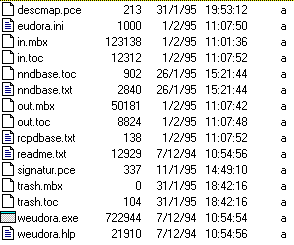
- eudora.ini
- Your Configuration and Switches information is saved in the eudora.ini file, along with other information. This file contains notes that describe each entry.
- nndbase.txt
- Your nicknames are saved in the nndbase.txt file.
- nndbase.toc
- This file is the table of contents for your nicknames.
- in.mbx, out.mbx, trash.mbx
- These files hold your mail. You'll see files like these fo
r every mailbox you create.
Note: These files are in UNIX mail format.
- in.toc, out.toc, trash.toc
- These files are the tables of contents for your mailboxes. They make it much faster for Eudora to access your mail. You'll see fil
es like these for every mailbox you create.
- eudora.log, old.log
- Eudora can keep records of all mail transfers. These records are kept in the eudora.log and old.log files. The old.log file is overwritten and a new eudora.log fi
le is created when the eudora.log file reaches its approximately 100K maximum size. To enable logging, set the LogLevel entry in the [Debug] section of the eudora.ini file.
- signatur.pce
- The signature is kept in the signa
tur.pce file.
- descmap.pce
- Mappings between mailbox names and DOS 8.3 file names are stored in the descmap.pce file.
If you are sharing a PC with other users, make a s
eparate mail directory and create a separate program item for each user. The directories can be named whatever you like, and put anywhere you like, including on floppies or network volumes. To tell Eudora which directory to use, specify that directory a
s the first parameter on the Command Line of the Program Item Properties dialog.

Contents Page, Previous Chapter, Next Chapter