Contents Page, Previous Chapter, Next Ch
apter
Eudora can access two different directory services, Ph and Finger, via the Ph window. To display the Ph window, select Ph from the Window menu.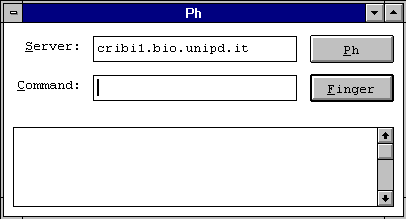
The Ph window has two buttons (one for Ph and one for Finger), and three text fields; one where you specify which server to use (Server), one where you type your query (Command) and one where you see the response.
To use the Ph protocol, the name of a Ph server must be entered in the Server field or use the default server (the default is what is entered in the Ph Server field of the Configuration... dialog). Then type the name of the person you wan
t to look up in the Command field and click on the Ph button. The server's response is displayed in the response field.Note: You can type any Ph command in the query field, except login commands or commands requiring login. For more informa
tion about the Ph server source code, see Appendix A.
To use the Finger protocol, type your query into the query field. This query should be in the form name@domain. If you omit the @domain s
egment, Eudora uses the servers listed in the Server field. Once the name is entered, click on the Finger button.The finger query is sent to the host specified in the @domain part, and the response is displayed in the response field.
<
IMG SRC="eudora89.gif">
Contents Page, Previous Chapter, Next Chapter